

How to Invest in GPU as a Service: A Practical GPUaaS Guide
Important: GPU specifications, software entitlements, pricing and export-control requirements can change. Confirm all details with the relevant OEM, distributor, software provider, data-centre operator and professional adviser before procurement.
What is GPU as a Service?
GPU as a Service, or GPUaaS, allows customers to rent GPU computing capacity without purchasing and operating the hardware themselves. The provider supplies the GPU servers, networking, storage, data-centre capacity, software platform, security, metering and technical support.
Customers may pay by GPU-hour, reserved node, training job, token, request, model endpoint or managed private cluster.
GPUaaS is not a passive hardware investment. It is a capital-intensive infrastructure and managed-services business. Profitability depends mainly on utilisation, electricity and colocation cost, financing, customer demand, software operations and the ability to secure the right hardware.
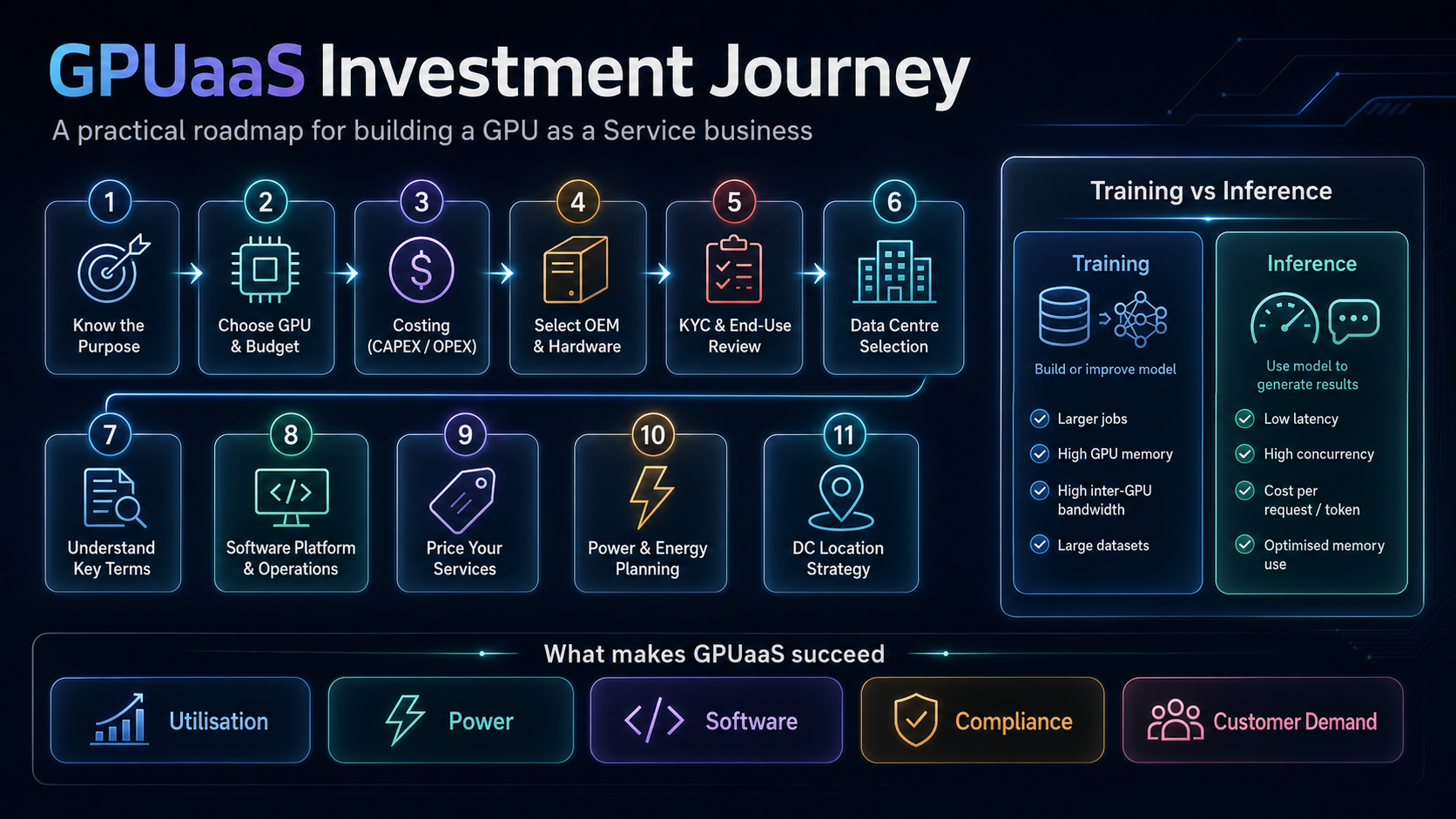
1. Know the purpose: training or inference
The first question is not “Which GPU should we buy?” It is:
What workload will run on the infrastructure, and who will pay for it?
Training
Training builds or improves a model. It includes LLM pre-training, fine-tuning, reinforcement learning, computer vision, traditional machine learning, world models and physical AI.
Training usually needs large GPU memory, fast GPU-to-GPU communication, high-speed storage, reliable checkpointing and long uninterrupted jobs. A small fine-tuning workload may use one to eight GPUs, while large foundation-model training may require hundreds or thousands.
Inference
Inference runs a trained model to generate an answer, prediction, image, video or action. Typical workloads include LLM chat, AI agents, embeddings, reranking, speech, computer vision, recommendations and generative media.
Inference is normally designed around low latency, high concurrency, memory efficiency, uptime and cost per request or token.
Training customers normally buy dedicated capacity and predictable job completion. Inference customers usually buy endpoint availability, throughput and service levels.
2. Choose the right GPU
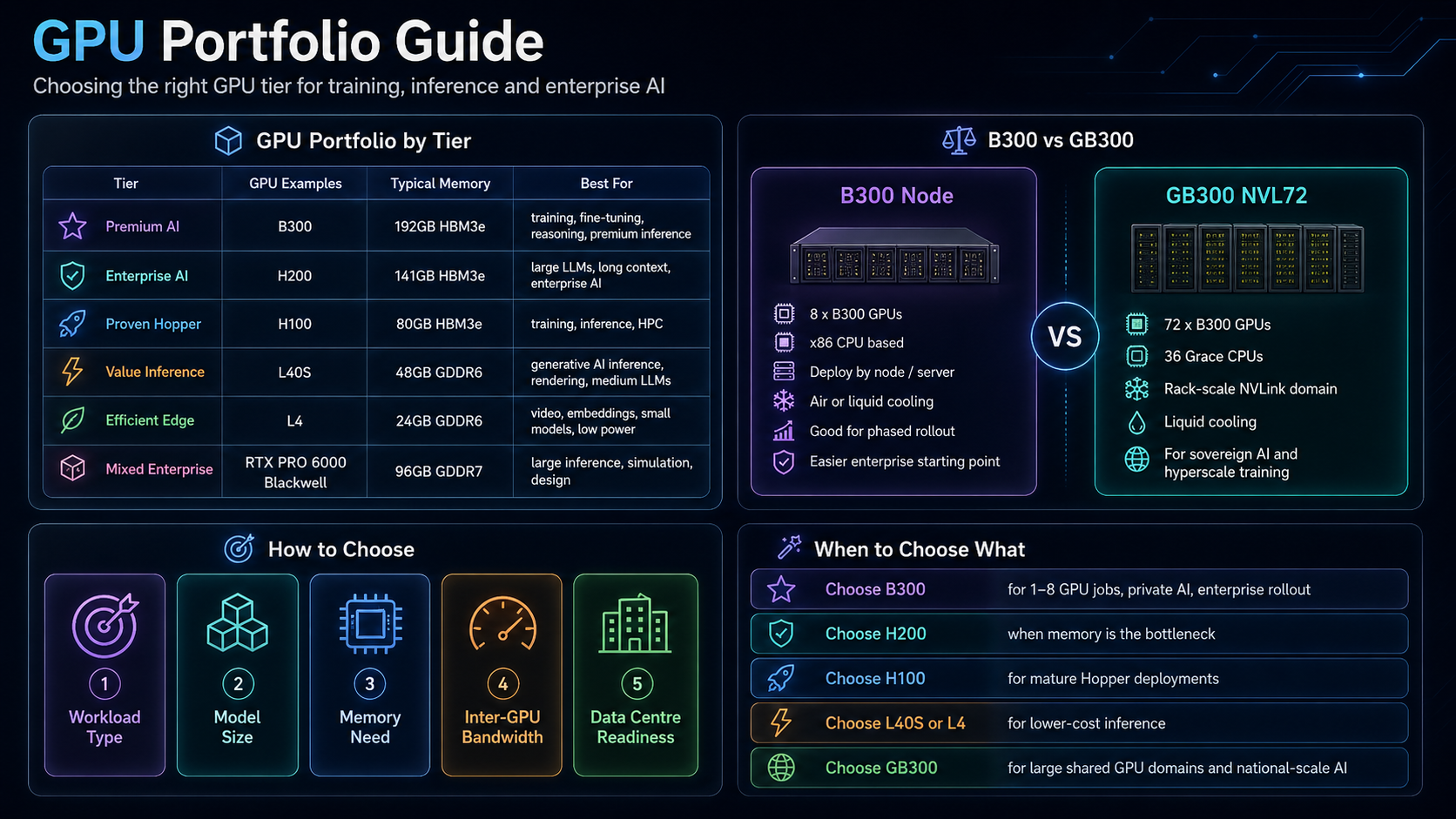
There is no universal “best GPU”. The correct choice depends on model size, memory, workload type, interconnect needs, data-centre readiness and budget.
| GPU or system | Memory | Best suited for | Key point |
|---|---|---|---|
| H100 SXM | 80GB HBM3 | Mature high-end training, inference and HPC | Widely deployed Hopper platform |
| H200 SXM | 141GB HBM3e | Large LLMs, long context and memory-heavy inference | More memory than H100 |
| B300 | 288GB HBM3e per GPU | Premium training, fine-tuning, reasoning and inference | Current Blackwell Ultra option |
| GB300 NVL72 | 72 B300 GPUs; about 20TB aggregate GPU memory | Sovereign AI, very large models and hyperscale clusters | Rack-scale, liquid-cooled platform |
| L40S | 48GB GDDR6 | Generative AI inference, rendering and medium LLMs | Lower-cost PCIe option; no NVLink |
| RTX PRO 6000 Blackwell Server Edition | 96GB GDDR7 | Large inference, simulation, graphics and design | Flexible enterprise platform |
| L4 | 24GB GDDR6 | Video, embeddings, smaller models and low-power inference | 72W, compact and efficient |
H100 or H200?
Choose H100 for a mature, widely deployed Hopper environment. Choose H200 when GPU memory is the main constraint, especially for larger models, longer context windows and larger inference caches.
B300 or GB300?
B300 is the GPU used in eight-GPU systems such as DGX or HGX B300. A B300 node is a practical starting point for enterprise GPUaaS because it can be deployed server by server.
GB300 combines Grace CPUs and B300 GPUs. A GB300 NVL72 contains 72 GPUs and 36 Grace CPUs in one rack-scale NVLink domain. It is intended for very large workloads and requires specialised liquid cooling and high-density power.
In practice:
- Choose B300 for phased rollout, dedicated eight-GPU nodes and enterprise AI.
- Choose GB300 for large shared GPU domains, sovereign AI and national or hyperscale infrastructure.
- Choose L40S, RTX PRO 6000 or L4 when lower-cost inference is more important than maximum training performance.
Avoid calling any GPU “the most popular” unless supported by market data. A safer statement is that B300 is a major current-generation option for new high-end deployments.
3. Budget beyond the GPU
The GPU is only one part of the total investment.
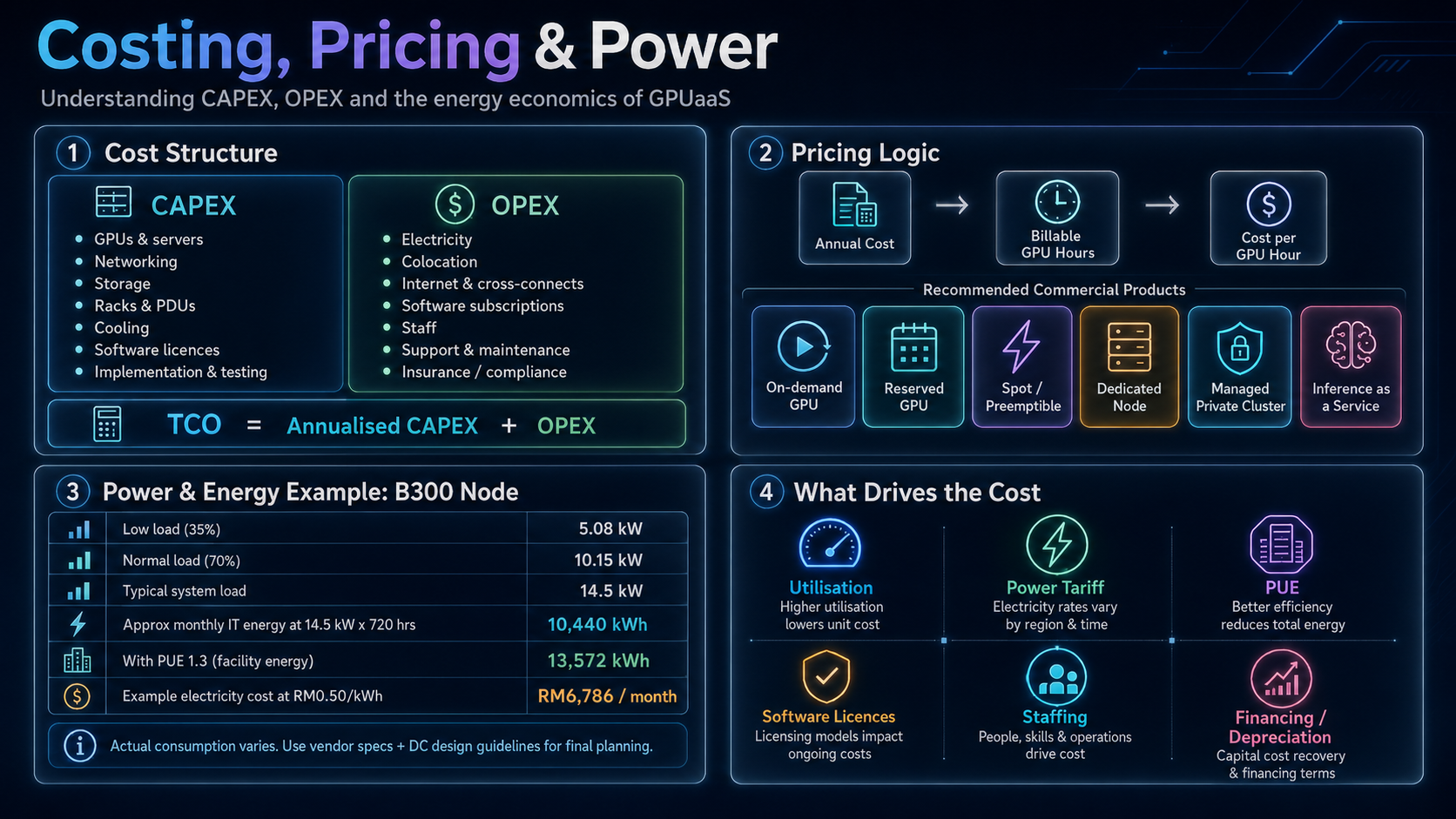
CAPEX
Capital expenditure includes the GPU servers, CPUs, memory, local NVMe storage, racks, PDUs, cooling components, management servers, firewalls and spare parts.
It also includes two types of networking:
- Scale-up fabric: NVLink and NVSwitch connect GPUs within a server or rack-scale NVLink domain.
- Scale-out fabric: InfiniBand, Spectrum-X or high-performance Ethernet connect multiple nodes and racks.
Storage must be sized for throughput, checkpointing and concurrent access, not just total terabytes.
OPEX
Operating expenditure includes electricity, colocation, cooling charges, internet and cross-connects, software subscriptions, maintenance, remote hands, engineering staff, insurance, financing and customer support.
For most new GPUaaS operators, colocation is faster than building a data centre. However, a conventional data centre designed for 5kW or 10kW racks may not support B300 or GB300 infrastructure.
4. Select the right OEM and integrator
The better industry terms are server OEM, GPU system vendor or AI infrastructure integrator.
Common vendors include Supermicro, Dell, HPE, Lenovo, GIGABYTE and QCT. The lowest quotation is not always the lowest total cost.
Evaluate certification, delivery lead time, local warranty, on-site support, spare parts, firmware lifecycle, cooling design, installation support, export-compliance capability and financing.
For high-density systems, the OEM, network vendor, data-centre operator and software team should validate the complete architecture together.
5. Prepare for supplier KYC and end-use review
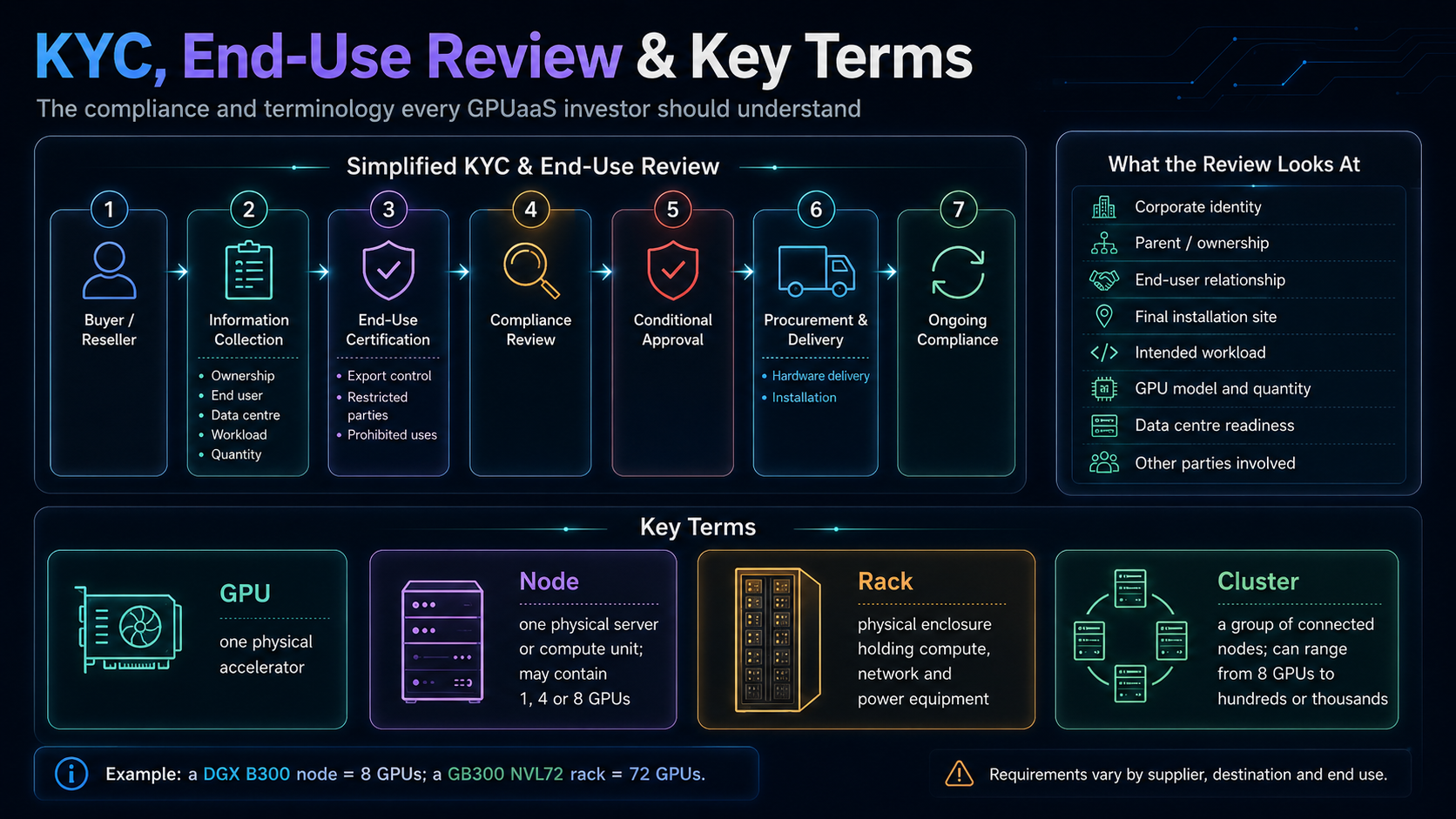
Advanced GPU procurement may require corporate, technical, end-user and export-control due diligence before the order is approved.
This is often described commercially as an NVIDIA KYC process, but it is not necessarily one universal NVIDIA workflow. The review may be conducted by the OEM, distributor, reseller, financing party or compliance team.
The review may ask for:
- Corporate identity, ownership, parent company and authorised representatives
- Buyer, reseller, integrator and ultimate end-user relationships
- Final installation and data-centre location
- Intended training or inference workload
- GPU model, quantity and technical justification
- Deployment, networking, power and cooling plans
- Funding information and end-use declarations
For GPUaaS providers, the review may also examine who the hosting customers are, where they are located, how they are screened and how remote access is controlled.
Prepare this information early. Data-centre selection and KYC should run in parallel because the final installation address, power allocation and facility readiness may be required during the review.
Completing the documentation does not guarantee approval or GPU allocation.
6. Choose an AI-ready data centre
Uptime Institute tiers describe resilience:
| Tier | Meaning |
|---|---|
| Tier I | Basic capacity |
| Tier II | Redundant capacity components |
| Tier III | Concurrently maintainable |
| Tier IV | Fault tolerant |
Tier level alone does not make a facility AI-ready. A Tier III site with high-density power and direct liquid cooling may be more suitable than a Tier IV site designed for conventional servers.
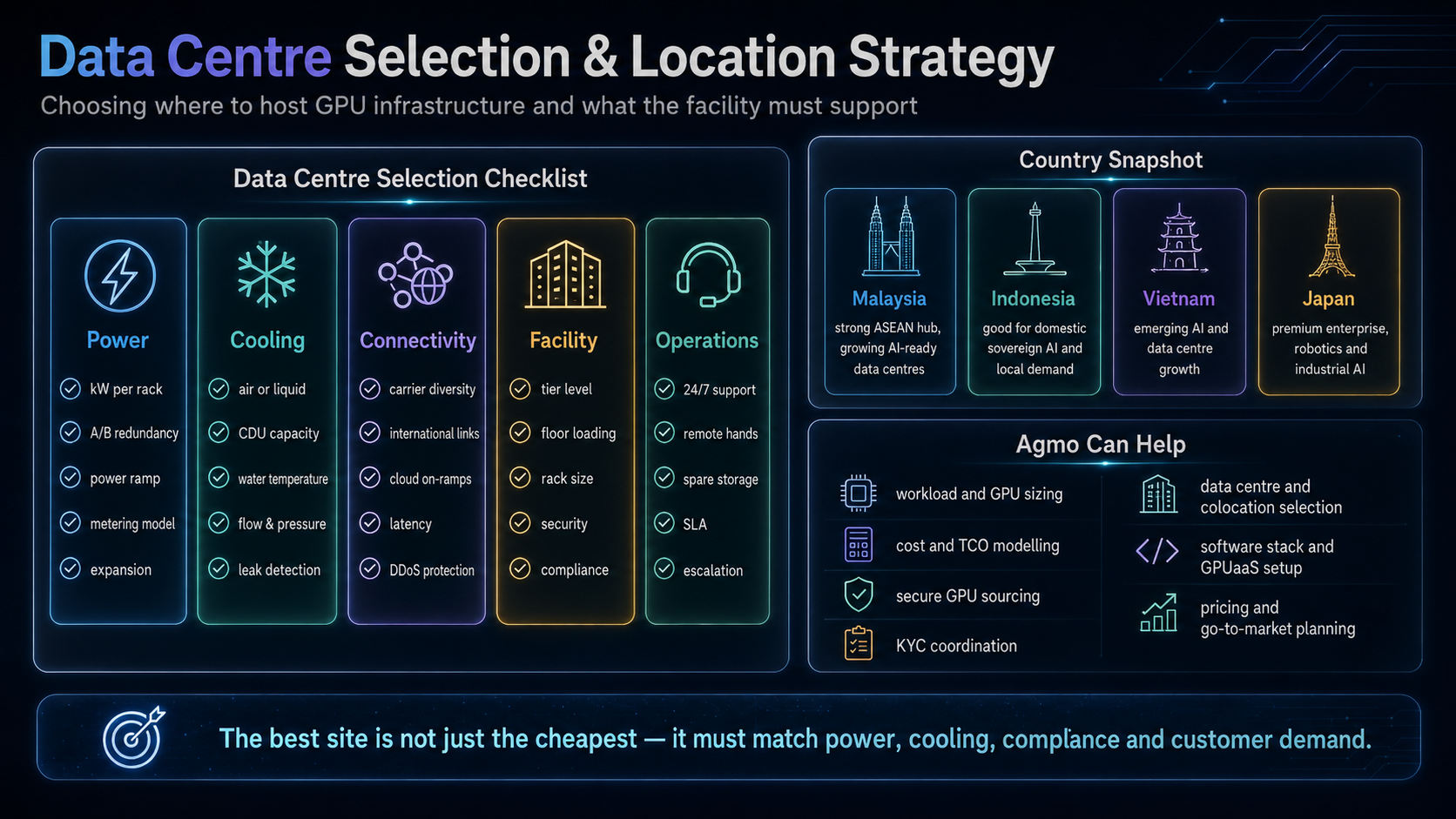
Check five areas:
- Power: committed kW per rack, A/B redundancy, peak capacity, PDUs and expansion.
- Cooling: air or liquid cooling, CDU capacity, water temperature, flow, pressure and leak detection.
- Connectivity: carrier diversity, international routes, cloud on-ramps, latency and DDoS protection.
- Facility: floor loading, rack size, delivery route, physical security and certifications.
- Operations: 24/7 remote hands, spare-part storage, escalation and maintenance procedures.
For GB300, confirm direct liquid cooling, rack-level power, CDU capacity and commissioning responsibility in writing.
7. Understand the basic terms
| Term | Meaning |
|---|---|
| GPU | One physical accelerator |
| Node | One physical server or compute unit; it may contain one, four or eight GPUs |
| Rack | The physical enclosure holding compute, network, power and cooling equipment |
| Cluster | A group of connected nodes managed as one resource pool |
A DGX B300 node contains eight B300 GPUs. A GB300 NVL72 rack contains 72 GPUs. A larger cluster may contain multiple NVL72 racks, so “one cluster” does not have a fixed GPU count.
Always ask suppliers to state the exact GPU quantity, GPUs per server, server count, rack count, network topology, storage, redundancy and power requirement.
8. Build the software platform
Buying GPUs does not automatically create a GPU cloud.
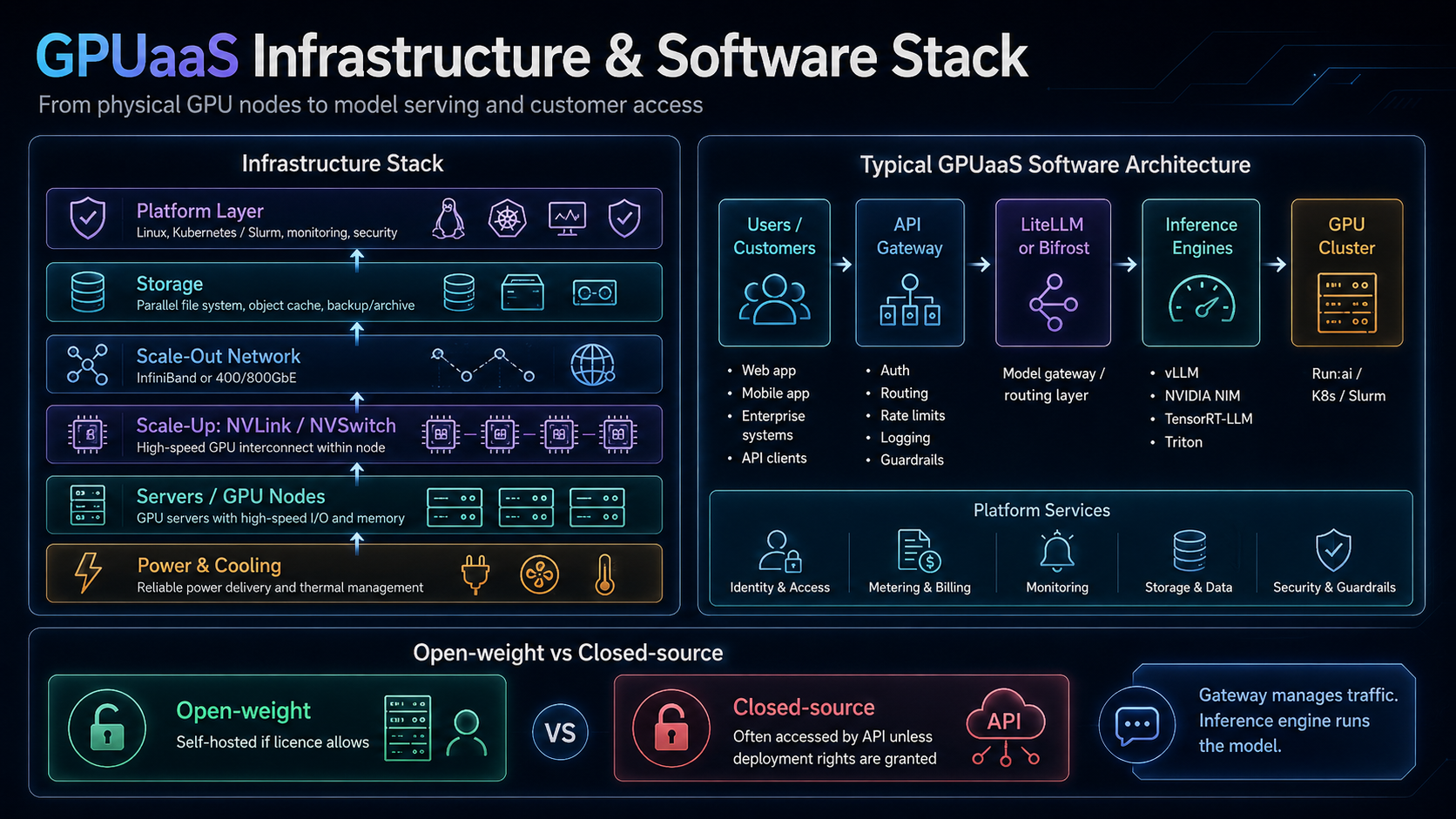
A practical stack normally includes:
Infrastructure: Linux, NVIDIA drivers, CUDA, NCCL, containers, monitoring and security.
Orchestration: either Kubernetes with NVIDIA Run:ai, or Slurm for batch training and HPC. Run:ai operates on Kubernetes; it is not a replacement for Kubernetes.
Inference engines: vLLM, NVIDIA NIM, TensorRT-LLM, Triton or SGLang.
AI gateway: LiteLLM or Bifrost for model routing, API keys, budgets, rate limits, fallback and observability.
Platform services: tenant identity, metering, billing, storage, logging, guardrails and customer support.
A typical request flow is:
Customer application → edge/API management → LiteLLM or Bifrost → vLLM, NIM or TensorRT-LLM → GPU cluster
The gateway manages traffic and policies. The inference engine actually runs the model.
Open-weight and closed-source models
Open-weight models may be self-hosted if their licence permits commercial use. Closed-source models are usually accessed through an API unless the owner grants deployment rights.
The operator should review commercial rights, redistribution, acceptable-use restrictions and geographic limitations before hosting any model.
9. Confirm NVIDIA software entitlements
Do not assume every NVIDIA service is included with every GPU purchase.
NVIDIA AI Enterprise may include enterprise drivers, selected NIM services, Kubernetes operators, Run:ai and enterprise support, depending on the release and commercial agreement.
Some H100 and H200 products may include multi-year NVIDIA AI Enterprise subscriptions, while Blackwell-based DGX systems may require separate licences.
NIM access also varies. Some services can be used through developer programmes, while production environments may require NVIDIA AI Enterprise for support, security and API stability.
Omniverse is mainly relevant to industrial digital twins, robotics, simulation, synthetic data and physical AI. It is not required for a standard LLM inference service.
Confirm all entitlements in the OEM or distributor quotation.
10. Price the service
Start with unit economics, not competitor advertisements.
A simplified formula is:
Annual cost = annualised CAPEX + financing + colocation + electricity + software + network + staff + support
Billable GPU-hours = GPU quantity × 8,760 × utilisation × availability
Cost per GPU-hour = annual cost ÷ billable GPU-hours
Then add margin, taxes, credit risk and a reserve for unexpected costs.
Common commercial products are:
- On-demand GPU: highest hourly rate, no commitment
- Reserved GPU: lower rate with monthly or annual commitment
- Spot GPU: discounted spare capacity that may be interrupted
- Dedicated node: one customer rents the whole server
- Managed private cluster: dedicated infrastructure with SLA and support
- Inference as a Service: charged by token, request, image, video or endpoint
Sovereign AI can support premium pricing when customers require local data residency, dedicated infrastructure, local support and regulatory compliance. The premium should reflect real value, not artificial scarcity.
11. Understand power consumption
Power is measured in kilowatts; energy is measured in kilowatt-hours.
For a DGX B300, NVIDIA planning materials indicate approximately 14.5–15kW estimated system power, depending on configuration, with estimated peak facility requirements of about 19–19.7kW.
Using 14.5kW continuously for 720 hours:
- IT energy: 14.5 × 720 = 10,440kWh
- Facility energy at PUE 1.3: 13,572kWh
- Illustrative cost at RM0.50/kWh: RM6,786 per month
The PUE and electricity tariff are examples only. Actual consumption depends on workload, power caps, CPUs, networking and cooling. Data-centre design should use the applicable peak requirement, not only average usage.
GB300 NVL72 requires a completely different facility class, with rack-level power potentially exceeding 100kW and specialised liquid cooling.
12. Select the location
Country selection should be based on customer demand, latency, data residency, electricity, power availability, cooling, connectivity, regulation, talent and expansion capacity.
- Malaysia: strong ASEAN hub with a growing AI-ready data-centre ecosystem.
- Indonesia: attractive for domestic sovereign AI, Bahasa models and local enterprise demand.
- Vietnam: emerging AI and manufacturing market with growing digital infrastructure.
- Japan: suited to premium enterprise, robotics, automotive and industrial AI workloads.
These are potential market positions, not guarantees. The final decision must be based on the specific facility, tariff, connectivity, compliance requirements and available power.
Key investment risks
The main risks are low utilisation, rapid hardware obsolescence, delivery delays, insufficient data-centre capacity, weak software operations, customer concentration, currency exposure and changing export controls.
The safest approach is to secure anchor customers, confirm the data centre, complete supplier due diligence and validate the software platform before committing to a large hardware order.
Frequently asked questions
Is GPUaaS a good investment?
It can be, but only when demand, utilisation, power, financing and operations are properly validated. Idle GPUs depreciate quickly.
Is B300 better than H200?
B300 is a newer Blackwell Ultra GPU with significantly more memory per GPU. H200 remains a mature Hopper option for memory-heavy enterprise workloads. The right choice depends on price, availability and workload.
Is one GB300 cluster equal to 72 GPUs?
Not necessarily. One GB300 NVL72 rack has 72 GPUs, but a cluster may contain one or many racks.
Is LiteLLM an inference engine?
No. LiteLLM is mainly an AI gateway and model router. vLLM, NIM, TensorRT-LLM or Triton runs the model.
What is NVIDIA Run:ai?
Run:ai is a Kubernetes-based GPU orchestration platform for scheduling, quotas and resource sharing.
Does completing KYC guarantee supply?
No. Approval also depends on supplier allocation, product availability, data-centre readiness and the applicable compliance review.
Build a GPUaaS platform with Agmo
A successful GPUaaS project must align workload demand, GPU selection, server architecture, networking, storage, data-centre capacity, software, compliance and commercial pricing.
Agmo can support the full journey, including:
- Business-case, workload and GPU-sizing consultation
- GPU, OEM and distributor coordination
- Supplier KYC and end-use review preparation
- Data-centre and colocation sourcing
- Power, cooling, network and storage assessment
- Kubernetes, Run:ai, Slurm and inference-platform implementation
- LiteLLM, Bifrost, vLLM, NIM and metering architecture
- Security, tenant isolation, billing and go-to-market planning
From selecting and securing the GPUs to identifying an AI-ready data centre and deploying the software platform, Agmo can coordinate the complete GPUaaS implementation.
Contact us today at our contact form